Showing posts with label Photoshop. Show all posts

Tuesday, 15 November 2011

Gambar Potret

Gambar potret, sesuatu yang sangat unik untuk di snap. Gambar potret ini sangatlah penting untuk mengungkap kenangan yang tidak mahu di lupakan. Gambar potret yang cantik menggunakan sudut  yang betul dan mengikuti peraturan satu pertiga. Sebagai contoh, jika kita menangkap gambar muka keseluruhan, kedudukan mata mestilah di garisan satu pertiga itu..

garis satu pertiga pada mata
Gambar yang disnap lebih baik daripada di crop pada gambar. Namun begitu, kalau terpaksa crop, lagi baik crop, untuk edit yang baik. Banyak cara boleh digunakan untuk mencantikkan gambar.

Sunday, 13 November 2011

Kehebatan Teknologi

Tinosour vs Red Fox

Saturday, 12 November 2011

How to Clean Scars at Face Using Adobe

Straight to the point. Using adobe Photoshop, portrait picture can be nice picture if we good in editing. So, what i want to share is about the way to remove pimples, scars or anything that you don't like at your picture. How??

First, choose your picture that you want to edit.
Example:

Thursday, 20 October 2011

How to make header using photoshop(english version)

Header in Blog..how to make it?
First of all, choose NEW at File. So your screen will appear something like this:
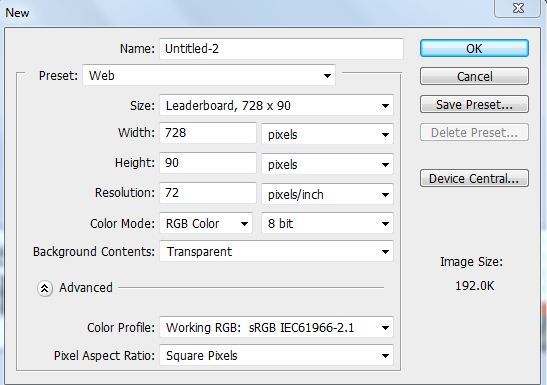
this setting to fixed your background
So, choose Web at preset, and change the background content to Transparent, if you want your background transparent. Then click Ok.
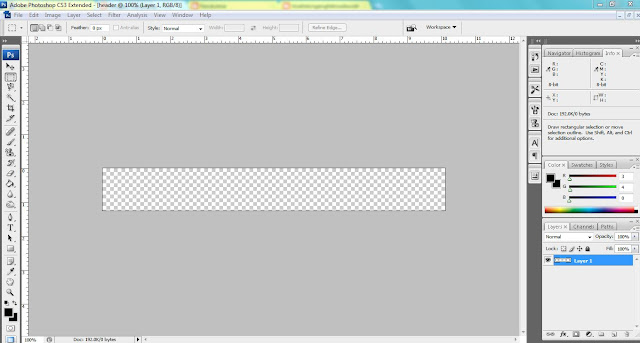
your background will appear like this
When, you have your background, you can start to make your header. For example, i choose all image below to make header.


All pictures that i choose, i crop, erase any unwanted thing and drag it to my background. You can duplicate the image you want, f it suitable with your header.
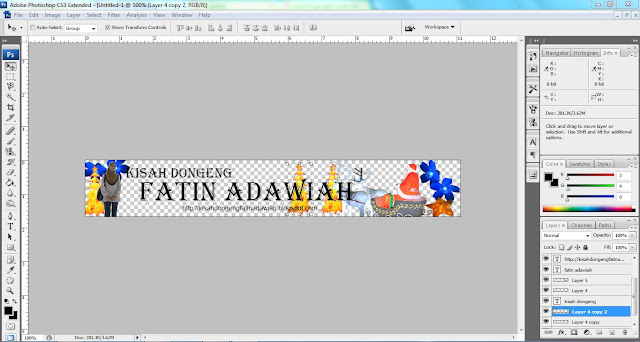
this a header that has finish edit
the header must be simple and not to crowded with image, so it can seen nice. When the header finish, we need to save it using 'png' format..
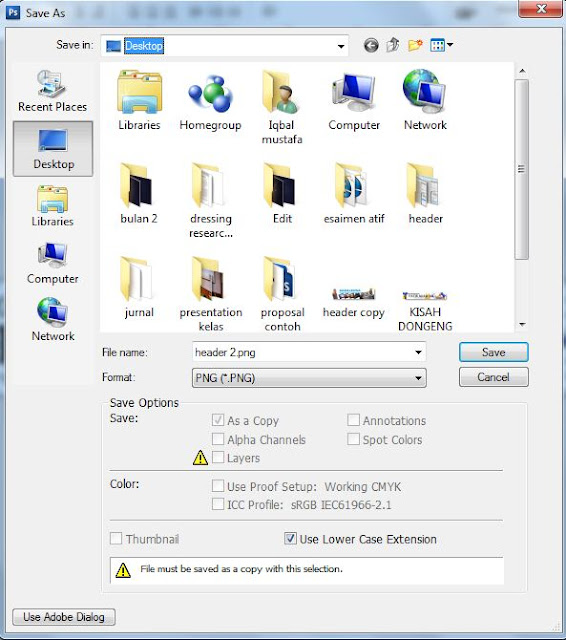
use 'png' format
click 'interlaced' to confirm your background transparent.
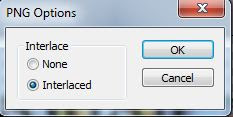
click 'interlaced', then ok
the result will show like this

Nice to try..Nice to share..

Wednesday, 19 October 2011

Bagaimana nak buat header guna Photoshop(how to make header using Photoshop)..

Dalam keboringan petang, aku wat satu lagi header baru...mungkin minggu ni, minggu untuk photo editing.
jd mcm mn aku header ni..

ni header nyer..dah pun letak pada blog si Dia
first skali aku pilih NEW..akan kuar  benda ni..


Selepas itu, pilih Web. kalau nak lagi besar, tukar pada saiz..kalau nak background transparent just tukar pada background content. dah siap pilih, juz click ok. akan kuar macam ini.


apabila dah kuar benda ni,  pilih gambar yang korang nak. contoh gambar yang aku pilih..


Atas ni, adalah gambar-gambar pilihan aku..so aku crop, potong ikut kehendak aku. so, bila siap semua, akan jadi macam ni.


bila dah siap, just save guna format 'png', dan amik 'interlaced' untuk background transparent.
save in png format

take interlaced for transparent background
hasil nya,

selamat mencuba..u must try it..

Bagaimana nak buat header guna photoshop

Header baru aku...
memang nampak mcm biase..tapi background transperant

Sedang boring..aku wat header untuk blog aku..first header yang aku wat dulu..cukup gemuk... mula-mula buat header aku juz guna photoshop untuk crop gambar saja..biasa la..MALAS...

Header pertama aku...

Header aku yang kedua macam header baru aku, tapi buruk sikit, sebab background dia putih..sepatutnya background transperant, tapi ape silap nya aku pun baru tau..juz salah format masa save jer..
yang ni background warna putih..so, jadi rosak aku nyer header..

yang ni yang terbaru...macam yang kat atas 2..

yang ni lak, header untuk si Dia...Fatin adawiah..

Saja aku wat besar-besar, nampak sikit kan...hahaha
Lupa nak cerita...nak wat guna adobe...juz amik NEW..setting pada WEB...amik LEADERBOARD...klu rase kecik, tambah saiz sendiri...and amik transparent untuk background...so...gne la kreativiti sendiri..untuk wat header...kalau aku, aku guna gambar-gambar yang aku tangkap..mudah nak cari, xpayah susah-susah pikir...
Related Posts Plugin for WordPress, Blogger...